
TECHNOLOGY
9 Must-Try Video AI Generator Options for Beginners in 2026

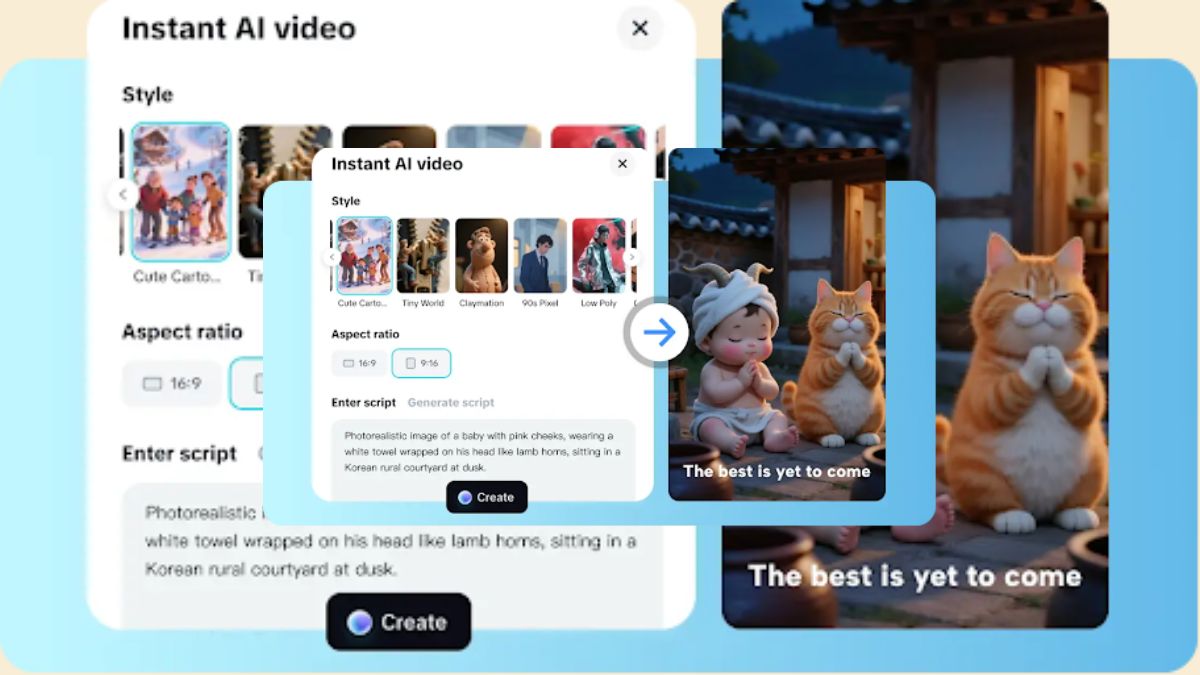
Every video AI generator I’m recommending has undergone structured, extensive testing to measure speed, rendering stability, AI accuracy, and workflow usability. I ran each platform through multiple real content tasks—from short social clips to long-form edits—to see how well they actually perform under pressure. This process exposed which tools slow you down and which ones genuinely streamline the creative process, making this list built entirely on verified performance. Some failed; a few delivered solid speed and quality. CapCut stood out with its smooth workflow, realistic visuals, and built-in editing. If you want a video AI generator that saves time and produces polished, ready-to-share videos efficiently. Keep reading!
What I Learned After Testing 30+ AI Video Generators
Before diving into the list, here’s a snapshot of the biggest lessons from my testing experience:
What Actually Matters for Beginners
| Priority | Why It Matters | My Preferred Tools |
| Speed | Beginners need output fast, not perfect | CapCut, Bing Video Creator |
| Simplicity | Too many menus ruin creativity | Fliki, Wisecut |
| Free Features | Paywalls kill motivation early | CapCut, Bing Video Creator |
| Auto-Editing | Removes the scary “timeline” learning curve | OpusClip, Wisecut |
| Social-Ready Exports | Most beginners post on TikTok/IG | CapCut, Zebracat |
| Script or Prompt Flexibility | Helps when ideas feel stuck | CapCut, Fliki |
Many “advanced” tools deliver stunning visuals—but require too much setup for new creators. I intentionally excluded complicated tools like Runway ML for this reason.
Why I Trust These Tools: A Quick Rundown of My Testing Criteria
I stopped relying on flashy ads and started judging tools by how well they helped me produce real videos. My personal evaluation focused on:
Simplicity
If I needed more than a few minutes to understand how to make my first clip, I moved on.
Automation Quality
AI should reduce steps, not add extra ones. I looked closely at caption accuracy, pacing adjustments, scene suggestions, and voice-over timing.
Free Access
Beginners shouldn’t be forced to commit financially just to test ideas.
Export Flexibility
I checked whether I could publish to TikTok, YouTube, and Instagram without reformatting.
Realistic Output
The video doesn’t need to look like a Pixar film; it just needs to be clean, clear, and engaging.
Summary of Findings – 10 Incredible Video AI Generators Tested in 2026
After spending time testing these video AI generators, I noticed that each tool brings something unique to the table. Some excel at fast social videos, others shine in automation or repurposing long content, while a few are perfect for script-driven narration. Here’s my personal take on the platforms that stood out in 2025:
- CapCut: This quickly became my top choice for creating vertical videos and YouTube Shorts. With features like Instant AI Video, avatar cloning, and pre-made templates, I could produce professional clips in minutes without losing creative control.
- Bing Video Creator: Ideal for rapid tests or proof-of-concept clips. I used it for short scripts and vertical videos, appreciating the speed and simplicity, especially when experimenting with multiple ideas.
- OpusClip: Perfect for turning long footage into short, social-ready clips. The AI detects highlights, inserts B-roll, and handles multi-format exports, saving me hours of editing time.
- Fliki: My go-to for narrated content and script-driven videos. The AI voices sound natural, and multilingual subtitle support lets me create accessible content quickly. I rely on it for product explainers and tutorials.
- Designs.ai Videomaker: Excellent for templated social media and marketing clips. I loved how the AI automatically syncs narration with visuals and applies brand colors, cutting down editing time drastically.
- Wisecut: I turn to this for raw footage that needs post-production automation. Silence trimming, highlight detection, and auto-captions make my content ready for social sharing almost instantly.
- Vidu: Great for stylized 2D animations. I used it for short creative projects where visual consistency across scenes mattered. The AI makes animation simple and fast without compromising quality.
- Zebracat: I rely on this for marketing and promo videos. It automates editing, integrates avatars, and allows fast exports, making it easy to produce visually appealing campaigns quickly.
- Pippit: My choice for e-commerce and product videos. Carousel layouts, shoppable links, and scheduling features let me create polished sales-focused content efficiently.
Each of these tools fits a specific purpose depending on the type of video I want to create. CapCut remains my favorite for fast, AI-driven social videos, while OpusClip and Fliki are indispensable for repurposing content and narration-heavy projects. Tools like Wisecut, Designs.ai, and Pippit streamline workflows, making video creation faster and more enjoyable. Together, these nine platforms cover everything from quick social clips to professional-grade content with minimal manual effort.
1. CapCut
CapCut is a free, web-first AI avatar creator and video studio built for social creators. The platform transforms text into full video based on instant AI workflows. Strong templates take care of layout and timing. There are over 100 pre-made avatars, and a cloning feature, which allows making a custom digital twin based on a short clip.

Auto voice and captions as well as scene assembly cut production time drastically. The interface focuses on short-form and delivers vertical video to be used on platforms. Script helpers and brainstorming minimize writer’s block. CapCut also offers an AI-assisted YouTube Shorts maker experience for rapid vertical edits. Most of the core functions are free and fast to the free users.
| Feature | Description |
| Instant AI Video | Converts scripts to videos in one click with automated scene arrangement. |
| Avatar Library | 100+ avatars with natural expressions and lip-syncing for narration. |
| Avatar Clone | Creates a digital twin from a short clip of yourself. |
| AI Templates | Pre-made workflows for education, news, promos. |
| Brainstorm Tool | Suggests storyboards, outlines, and creative ideas. |
| Auto Captions | Generates accurate, time-synced subtitles with formatting options. |
Pros: Fast short-form video creation, large avatar library, time-saving templates, intuitive interface.
Cons: Some advanced features require Pro subscription.

How you can create AI Videos using CapCut
Step 1: Start with your script
The first step is to access the “Script” feature. In your “Topic” and “Key points” (your video concept), type here. Once you hit “Create” the video script is completely customized to your inputs. This is the foundation of the flow of your video and its tone. Review the generated script, make any necessary edits, and once you’re satisfied, proceed to the next step.

Phase 2: Get your script to life
Head over to the “Scenes” section, where you can upload voiceovers, pick AI avatars, or select from a vast selection for your design collection. If you only want voiceovers, then go to the “Voice” page and choose the best voice for your story. Click on the tab “Apply for all scenes” to get a consistent audio experience. Select the “Captions” button to adjust engaging captions (for wide accessibility of your video), and then select the “Music” library to provide the perfect background music that will help create an emotional impact.

Step 3: Export or perfect the video
Finally, preview your finished video to make sure that all is as it should be. “Export” it directly if satisfied with the final settings. If you want to go even more fine, click “Edit more” to reveal more advanced tools like graphics and filters and a vast assortment of stock elements to take your creativity to the next level.

What I Observed
I used CapCut to produce a quick Instagram Reel for a product announcement. I uploaded a script, selected a cheerful avatar, and let the AI generate the video. Within minutes, the vertical clip was complete, captions synced, and visuals polished. I also tested the avatar clone feature with a short video of myself, which created a realistic digital version of me. The brainstorming tool gave me ideas for scene transitions, making the video feel professional without extra effort. The export was smooth, and I posted the reel immediately. CapCut’s speed, intuitive interface, and variety of tools make it my first choice for creating social videos efficiently.
2. Bing Video Creator
I often use Bing Video Creator when I need instant social video tests or short concept clips. I can type a quick prompt and generate a vertical video in seconds. The Sora AI model ensures style consistency across outputs, and I can preview content on mobile instantly. I appreciate that I don’t need any payment to experiment with multiple prompts. When I want fast proof-of-concept videos for social media or story-based posts, this tool is my go-to for speed and convenience.
| Feature | Description |
| Prompt-to-Clip | Generates video from text input in under 10 seconds. |
| Vertical-First Output | Ready for stories and social media posts. |
| Style Consistency | Maintains a unified look across multiple outputs. |
| Auto-Captions | Quick subtitle generation. |
| Free Tier | No watermark, download options for social sharing. |

Pros: Free, rapid prototyping, mobile-friendly, social-ready.
Cons: Short video durations, visual quality limited, some styles locked.
What I Observed
I tested Bing Video Creator by writing a short script for a social media teaser. Within 10 seconds, the tool generated a vertical video ready for posting. I appreciated the speed and simplicity. Although I noticed minor visual quality limitations compared to CapCut, it was perfect for quick tests or short promotional clips. The free tier allowed multiple prompt experiments without any cost, making it ideal for brainstorming content ideas.
3. OpusClip
I turn to OpusClip whenever I need to repurpose long footage into short, viral-ready clips. I can upload recordings from webinars, podcasts, or streams, and the AI detects highlights automatically. I rely on the B-roll insertion and captioning features to make clips polished without manual edits. I love that I can prepare content for multiple social formats in a single workflow. OpusClip saves me hours, allowing me to focus on other creative tasks while still producing professional, shareable videos quickly.
| Feature | Description |
| Highlight Detection | Identifies shareable moments automatically. |
| AI B-Roll | Improves pacing and visual interest. |
| Captioning | Auto subtitles and styling. |
| Multi-Aspect Ratio | Prepares clips for Instagram, TikTok, YouTube Shorts. |
| Free Tier | Monthly processing allowance for testing. |
Pros: Efficient repurposing of long content, automatic enhancement, social-ready exports.
Cons: Not suited for creating videos from scratch, limited deep customization.
What I Observed
I used OpusClip on a 30-minute webinar recording. The tool instantly found key segments, added AI B-roll, and produced multiple vertical clips suitable for TikTok and Instagram. Captions were accurate, and the highlights were relevant. The workflow was straightforward; I only had to adjust minor details before exporting. I found it extremely useful for repurposing existing content quickly without re-editing from scratch.
4. Fliki
I use Fliki when I want to turn scripts into fully narrated videos quickly. The AI voices sound natural, and I can clone voices for consistency across multiple projects. I combine visuals and timelines effortlessly and add royalty-free music without hassle. I rely on Fliki for multilingual subtitles, making my content accessible to a global audience. When I need professional-looking narrated videos without spending hours recording and editing, Fliki gives me a fast, reliable solution that’s perfect for my content pipeline.
| Feature | Description |
| Script-to-Video | Transform text into complete videos. |
| Voice Cloning | Maintain consistent voice across clips. |
| Scene Builder | Match visuals to narration automatically. |
| Royalty-Free Music | Auto-sync with scenes. |
| Multi-Language Subtitles | Supports 80+ languages. |
Pros: Lifelike narration, fast video creation, simple timeline edits.
Cons: Heavy customization may require premium, visuals can feel templated.
What I Observed
I tested Fliki by creating a product explainer video. I uploaded a script, chose a professional AI voice, and added background visuals. The voice was natural and in sync with the text. Editing the timeline was simple, and I could preview the video before exporting. The free tier was enough for testing, and I appreciated the fast, polished output. Fliki is ideal for script-driven videos or narrated content.
5. Designs.ai Videomaker
I use Designs.ai Videomaker whenever I need templated social clips quickly. I upload my scripts, and the AI matches stock visuals, synchronizes narration, and applies brand elements automatically. I enjoy being able to swap themes and styles in seconds. I find trial credits useful to experiment without committing financially. When I want multiple branded promo clips fast, Designs.ai reduces my workload significantly. I rely on it for marketing campaigns where consistency, speed, and professional results are essential without spending hours manually editing.
| Feature | Description |
| Template Library | Pre-made scenes for fast video creation. |
| Brand Kit Integration | Include logos, colors, fonts. |
| Auto Sync | Align narration and visuals automatically. |
| Multi-Format Export | Resize for TikTok, Instagram, YouTube. |
Pros: Quick templated workflows, brand consistency, trial credits.
Cons: Templates may feel repetitive, high-res exports gated.
What I Observed
I tested Designs.ai by creating a promotional video for social media. I uploaded a script, chose a pre-designed template, and applied my brand colors and logo. The AI matched the narration perfectly with the visuals. Exporting was fast, and the result looked professional. While the template style felt a bit repetitive, I appreciated how quickly I could create multiple clips without manually editing every scene. This tool is ideal for marketers needing fast branded videos.
6. Wisecut
I often turn to Wisecut for quick post-production work because it automates silence removal, pacing adjustments, and highlight detection. I upload raw footage, and the AI handles captions and translations, which saves me hours of manual editing. I find the interface simple and distraction-free, allowing me to focus on creative tweaks rather than tedious adjustments. Wisecut ensures that my videos are social-ready almost instantly. Whenever I need clean, polished content fast, I rely on this tool to make my raw footage look professional.
| Feature | Description |
| Silence Trimming | Auto remove pauses for smooth pacing. |
| Highlight Detection | Identifies shareable segments. |
| Auto Captions & Translation | Subtitle generation in multiple languages. |
| Quick Export | Minimal steps to social-ready clips. |
Pros: Clean automation, fast workflow, accurate captions.
Cons: Limited creative styling, high-res export paid-only.
What I Observed
I used Wisecut on a webinar recording to create short highlight clips. The tool automatically removed silences, added captions, and adjusted the background music. I only had to make minor tweaks before exporting. The AI detected key moments very accurately, making the video ready for social posting within minutes. It’s perfect for creators who want clean, shareable content without manual edits.
7. Vidu
I use Vidu when I want stylized 2D animated clips or a cohesive visual style across scenes. I can input text or images, and the AI maintains continuity throughout the video. I find it especially useful for small projects or team collaborations where I want quick, polished outputs. Vidu helps me create short creative clips without needing to manually animate every scene. Whenever I want visually consistent, stylized videos that feel professional, I use Vidu because it’s fast, simple, and delivers results that meet my creative standards.
| Feature | Description |
| 2D Animation | Create cohesive animated scenes. |
| Multi-Input | Supports text and image inputs. |
| Style Consistency | Maintains visual continuity across scenes. |
| Fast Export | Short project turnaround. |
Pros: Stylized output, multiple input types, quick results.
Cons: Limited advanced customization, free access varies.
What I Observed
I experimented with Vidu by converting a product illustration into a stylized 2D animation. The system maintained consistent visuals across scenes and generated subtitles automatically. Export was fast, and the animation looked polished. Although customization was limited, I found it simple and effective for short creative videos with a cohesive style.
8. Zebracat
I rely on Zebracat for marketing and promotional videos when I need avatars, templates, and automated editing. I can add voiceovers, scene suggestions, and call-to-action overlays with minimal input. I appreciate the fast export speeds, which let me post campaigns directly to social media. When I’m short on time but still want professional marketing clips, Zebracat handles most of the workflow automatically. I use it when I need product promos that are visually appealing, efficiently edited, and ready to engage audiences quickly.
| Feature | Description |
| AI Avatars | Use avatars for narration and demos. |
| Auto Editing | Timeline edits handled automatically. |
| CTA Templates | Add call-to-action overlays. |
| Fast Export | Quickly shareable content. |
Pros: Efficient promo clips, avatar integration, automated editing.
Cons: Avatar realism limited, few motion controls.
What I Observed
I tested Zebracat for a product launch clip. I selected an avatar and applied a promotional template. The AI auto-edited the video, added a voiceover, and positioned a CTA overlay. Exporting was fast, and I posted directly to social media. The avatars looked slightly artificial in close-ups, but overall, the tool was highly efficient for marketing purposes.
9. Pippit
I use Pippit for e-commerce and shop-related content because it streamlines product video creation and scheduling. I can apply commerce-focused templates, add shoppable tags, and track analytics without extra tools. I rely on it for carousel videos and campaign planning, which saves me time and effort. The free trial allows me to experiment with formats and workflows before committing. Whenever I need professional-looking, conversion-focused videos for online stores, I turn to Pippit because it combines speed, automation, and performance tracking efficiently.
| Feature | Description |
| Commerce Templates | Pre-designed layouts for product promotion. |
| Scheduling | Plan posts in advance. |
| Analytics | Track performance metrics. |
| Carousel Video Builder | Multi-product video creation. |
Pros: Streamlined commerce videos, scheduling, analytics.
Cons: Limited creative flexibility, some templates paid.
What I Observed
I used Pippit to create a carousel video for a small online store. The template made layout easy, and I embedded shoppable links directly. Scheduling the posts saved me time, and the analytics dashboard helped track performance. While it’s primarily for commerce, the workflow was intuitive, making it ideal for online sellers who want fast, professional videos without much manual editing.
Comprehensive comparison for better selection
I’ve tested many video AI generators over the years, and I’ve learned that the best tool isn’t always the one with the flashiest features. It’s the one that fits your workflow, helps you create efficiently, and allows you to focus on storytelling rather than struggling with technical hurdles.
| Tool | Platform Compatibility | Rating (Overall) | Price | User Friendliness | Best Uses |
| CapCut | Web, Windows, iOS, Android | 4.9/5 | Free; Pro $19.99/month | 5/5 | Social videos, short-form content, YouTube Shorts, avatar-based videos |
| Bing Video Creator | Web, iOS, Android | 4.5/5 | Free | 4.8/5 | Quick test clips, social media teasers, vertical videos, proof-of-concept videos |
| OpusClip | Web, Windows, Mac | 4.6/5 | Starter $19/month; Pro $57/month; Enterprise Custom | 4.7/5 | Repurposing long videos, highlights extraction, TikTok/IG short clips |
| Fliki | Web, Windows, iOS | 4.5/5 | Free trial; Basic $21/month; Premium $132/month | 4.8/5 | Script-to-video, narrated content, multilingual subtitles, product explainers |
| Designs.ai Videomaker | Web, Windows, Mac | 4.4/5 | Free trial; Basic $19/month; Pro $49/month; Enterprise Custom | 4.7/5 | Templated social videos, branded content, marketing promos |
| Wisecut | Web, Windows, Mac | 4.3/5 | Free (with watermark); Pro $9.90/month | 4.6/5 | Raw footage automation, silence trimming, social-ready highlights |
| Vidu | Web, Windows, Mac | 4.2/5 | Free limited access (beta); Paid $29/month for 500 credits | 4.5/5 | Stylized 2D animated videos, short creative clips, consistent visual outputs |
| Zebracat | Web, Windows, iOS | 4.1/5 | Free trial; Starter $29/month; Pro $99/month | 4.4/5 | Marketing clips, avatars, promo videos, CTA-focused content |
| Pippit | Web, iOS, Android | 4.0/5 | Free trial; Standard $19/month; Premium $39/month | 4.3/5 | Commerce videos, product demos, shoppable content, scheduled posts |
By focusing on these factors, you’ll choose a free video AI generator that fits your workflow and produces professional-quality results. I’ve found that such tools make creating videos both easy and enjoyable.
Conclusion
Each person decides on a service in terms of needs, channels, time. CapCut is the best choice to use in quick verticals, faceless narration, and instant template-based builds. It is a combination of avatars, brainstorming and one-click video generation. CapCut commonly accelerates projects through idea to shareable file. OpusClip is good when it comes to repurposing long content. In the case of text-to-voice pipelines, Fliki is suitable. In the case of raw edit automation, the task is handled by Wisecut. In the case of very basic prompt tests, Bing Video Creator can provide instant proof-of-concept videos. On a personal level, CapCut is highly recommended to those creators who are interested in the quickest path to good results. Speed and capability balance make CapCut my first choice.
FAQs
Do you have a suggestion for a good free online video AI generator?
CapCut is highly recommended. It offers free AI video generation, Instant AI Video creation, avatar cloning, templates, and brainstorming tools—all optimized for fast, professional-quality social videos.
Can CapCut video AI generator create videos for YouTube Shorts?
Yes, CapCut has a built-in AI YouTube Shorts maker that simplifies the entire process of creating short-form vertical videos. It allows instant editing, automatic aspect ratio adjustment, and optimized export settings, ensuring videos fit perfectly for YouTube Shorts without any manual resizing.
Which tool is best for creating social media AI videos quickly?
CapCut video AI generator stands out as one of the most efficient platforms for rapid social media video creation. With AI-powered automation, ready-made templates, and one-click editing tools, it enables users to produce professional-quality videos in minutes, perfectly tailored for platforms like TikTok, Instagram, and YouTube Shorts.
Is it possible to generate AI avatars with CapCut video AI generator for free?
Yes, CapCut video AI generator offers access to over 100 free AI avatars, giving creators a wide range of digital characters for different video styles. It also includes an option to clone and customize your own avatar with unique facial expressions and voiceovers, ideal for creating personalized video content.
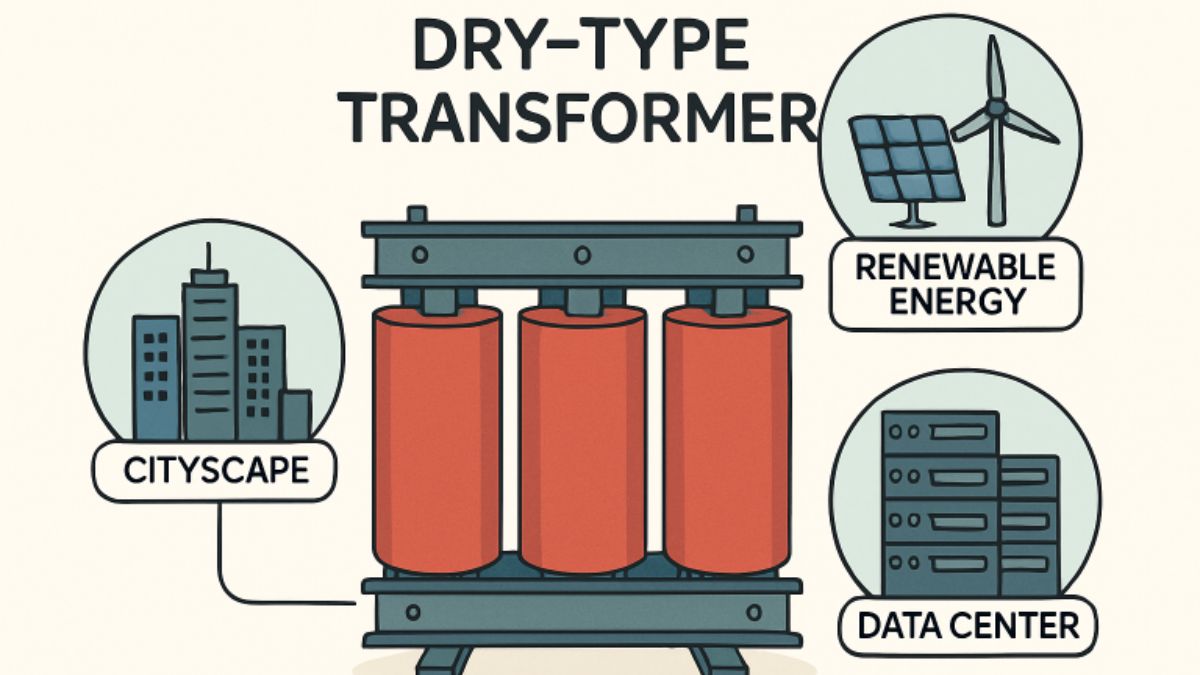
In today’s rapidly advancing world, electrical infrastructure must be robust, safe, and environmentally responsible. Dry-type transformers have emerged as crucial components, reshaping how power is distributed and protected across various settings. These transformers, which use air or solid insulation rather than oil, reduce operational risks and offer impressive adaptability for industries and communities alike. To learn more about dry type transformers and their applications to upgrade existing transformers to dry-type versions systematically and broadly.
Unlike oil-immersed transformers, dry-type transformers offer a significant leap forward in safety and environmental protection. They are increasingly chosen for settings where danger from leaks and fire poses serious risks, and where responsible energy practices matter. This versatility and reliability have made dry-type transformers essential in everything from skyscrapers to renewable energy grids, serving as a bridge toward a more sustainable and efficient future.
Enhanced Safety and Fire Resistance
Dry-type transformers are highly valued for their safety features. By replacing oil insulation with air or solids, the risks of leaks and fires are minimized, making them ideal for places where reliability and protection matter most. Hospitals, transit systems, and multistory commercial buildings benefit significantly from this technology. For example, safety-driven regulations in several major cities have led utility companies to systematically upgrade existing transformers to dry-type versions. These upgrades help prevent the use of flammable substances near the public, enhancing peace of mind for both operators and occupants.
Environmental Benefits
Increasing environmental awareness has spotlighted dry-type transformers as a responsible alternative. The absence of oil means there is no risk of soil or water contamination, even in the event of catastrophic failure. Their operation is also quieter, which suits installations in urban or residential environments with strict noise controls. Many models use recyclable materials, helping organizations align with sustainability targets. The reduced maintenance requirements and extended operational life further lower their environmental footprint, making them a favored choice among forward-thinking companies and municipalities.
Applications in Urban Infrastructure
Rapid urban growth has increased demand for compact, efficient, and safe electrical infrastructure in densely populated areas. Dry-type transformers are particularly suited to these conditions because they eliminate the need for oil-based cooling systems, reducing fire risk and removing the requirement for costly containment measures. Their streamlined, space-efficient construction allows them to fit into tight mechanical rooms, underground transit hubs, high-rise office buildings, and mixed-use complexes. Because they generate fewer environmental concerns and comply more easily with strict safety regulations, municipalities can meet rigorous fire codes while preserving valuable square footage and avoiding additional expenses for barriers, vaults, or specialized containment systems.
Role in Renewable Energy Projects
The global shift toward cleaner power sources has invited innovation in transformer technology. Dry-type transformers are tailored for integration within wind farms and solar power plants, where exposure to demanding environmental conditions is common. Their insulation materials withstand humidity, salt spray, and temperature swings, ensuring long-term reliability. According to the International Energy Agency, modern renewable installations are increasingly standardizing on dry-type step-up transformers, supporting growth in decentralized and sustainable electricity generation.
Adoption in Data Centers
With data centers forming the digital backbone of society, electrical reliability is more vital than ever. Dry-type transformers fulfill this requirement, offering outstanding voltage regulation and accommodating high load fluctuations. Because they do not contain oil, these transformers are more intelligently placed closer to sensitive equipment, reducing power losses due to distance. Notably, their adoption rate continues to rise in state-of-the-art centers, including leading Tier III and Tier IV data facilities. Their superior safety and low maintenance requirements allow operators to meet demanding uptime standards while keeping energy consumption in check.
Technological Advancements
The performance of dry-type transformers has improved dramatically due to ongoing innovation. The introduction of amorphous metal cores reduces energy losses and improves overall efficiency, helping users save on operational costs. Advances in insulation have led to better heat dissipation and the capability to accommodate even higher output demands. Digital monitoring integrated with these transformers provides round-the-clock diagnostics, predictive maintenance, and data analytics, further optimizing reliability and efficiency. These features have received attention from energy analysts, especially in the context of smarter, greener electric grids.
Future Outlook
As industries continue to set higher benchmarks for safety, sustainability, and performance, the adoption of dry-type transformers is poised for sustained growth. These transformers are expected to become even more versatile as new materials and technologies enhance their operating range and reduce costs. Their ongoing integration into key infrastructure, paired with evolving global standards, ensures a lasting presence. For those interested in the market’s trajectory and breakthrough research, recent work by Hitachi Energy highlights both current achievements and what lies ahead for the industry.

Introduction
As daily life increasingly centers on the home, the significance of the air we breathe indoors cannot be overstated. With approximately 90% of people’s time spent inside, especially in urban settings, the impact of indoor air quality on overall health and comfort is critical. Modern building practices aim to maximize energy efficiency and minimize drafts, often leading to homes being more tightly sealed. While this enhances temperature regulation and reduces utility costs, it can inadvertently lead to pollutants accumulating in the living space. For homeowners looking to protect their loved ones and ensure a healthy home, maintaining air quality is more essential than ever. For additional help improving your home’s environment, visit Pure Restore. Emerging health studies consistently show the relationship between poor indoor air and a range of conditions, from mild irritations to serious chronic illnesses. Children, seniors, and those with existing health conditions are particularly at risk. Understanding how to identify and remove indoor pollutants can dramatically improve both the comfort and long-term well-being of a home’s inhabitants.
Common Indoor Air Pollutants
Indoor air pollution is rarely caused by a single source. Most homes contain a complex mixture of airborne particles and gases, and each contributes its own set of potential health risks:
- Combustion Sources: Gas stoves, fireplaces, and fuel-burning appliances release carbon monoxide, nitrogen dioxide, and even particulate matter. Frequent or improper use of these appliances can lead to hazardous gas buildup.
- Household Products: Everyday cleaning solutions, paint strippers, varnishes, and synthetic furnishings often emit volatile organic compounds (VOCs). These chemicals are known to cause headaches and respiratory irritation and have been linked to longer-term health effects.
- Biological Contaminants: Indoor humidity or moisture can promote mold growth. Dust mites thrive in bedding and upholstered furniture. Pet dander and pollen can also collect indoors, triggering allergies and asthma attacks.
In identifying these pollutants, it is crucial for homeowners to think beyond visible dust or odors. Even products labeled as “green” or “natural” might release harmful compounds over time. Regular upkeep, mindful product selection, and appropriate ventilation form the foundation of a healthier indoor environment.
Health Implications of Poor IAQ
The consequences of neglecting indoor air quality reach far beyond just discomfort. Consistent exposure to poor air can result in immediate symptoms such as fatigue, headaches, dizziness, and irritation of the eyes, nose, and throat. More seriously, individuals exposed to high levels of indoor pollutants for months or years face a higher risk of chronic respiratory diseases, cardiovascular problems, and, in some cases, cancer.
Young children and older adults are especially susceptible due to developing or compromised immune systems. Poor IAQ has also been linked to increased absenteeism from school and work and may contribute to the severity of asthma and allergies, according to the American Lung Association.
Strategies to Improve Indoor Air Quality
Proactively improving indoor air quality begins with targeted interventions. These strategies are effective regardless of a home’s layout or age:
- Regular Ventilation: Incorporating daily routines such as opening windows and doors, a practice known in Germany as “lüften,” helps replace stagnant indoor air with fresh outdoor air. This simple strategy can rapidly reduce indoor pollutant concentrations and has been proven to improve sleep quality and mood.
- Use of Air Purifiers: Portable or central air purification systems equipped with true HEPA filters are effective at capturing airborne particulate matter, including dust, pollen, and some microbes.
- Maintenance of HVAC Systems: Scheduling routine inspections and changing air filters in heating, ventilation, and air conditioning systems prevents dust and other pollutants from recirculating. This is especially important for households with pets or those located near high-traffic areas.
- Control of Humidity Levels: Maintaining indoor humidity between 40–60% discourages mold and dust mite growth, both of which require moisture to thrive. Using exhaust fans in bathrooms, kitchens, and laundry rooms will help control humidity year-round.
Cleaning and Decluttering
Regular cleaning habits can significantly help reduce allergen accumulation. Focus on dust-prone surfaces, wash bedding and curtains frequently, and minimize clutter where dust tends to accumulate. Choosing unscented or low-VOC products also reduces exposure to artificial chemicals.
Role of Indoor Plants
The idea that houseplants are powerful natural air purifiers is widespread, largely due to the NASA Clean Air Study. While certain plants can absorb chemicals like formaldehyde or benzene in laboratory settings, real-world studies show their effect in everyday homes is modest. A typical home would require an impractical number of plants to make a measurable difference. As such, plants can enhance décor and provide a psychological boost, but should not replace mechanical air filtration systems for those with serious IAQ concerns.
Monitoring Indoor Air Quality
Recent technology advances have made it easier for homeowners to track air quality in real time. Affordable monitoring devices now display data on pollutants such as particulate matter, carbon dioxide, and VOCs. These tools allow for proactive adjustments, such as increasing ventilation when pollutant levels spike or identifying new sources of contamination. Modern systems employ artificial intelligence to provide actionable insights, alerting users to potential threats before they become serious health risks.
Final Thoughts
Maintaining excellent indoor air quality is a cornerstone of a safe, comfortable, and healthy home. By understanding common indoor pollutants and their health implications, homeowners are better prepared to protect their families. Implementing effective strategies, like regular ventilation, proper cleaning, air purification, and the use of advanced monitoring tools, can create an environment that supports long-term well-being for every occupant. Remember that health begins at home, and safeguarding your indoor environment is an investment in every resident’s quality of life.

Understanding Geo-Fencing in Digital Advertising
Geo-fencing has emerged as a transformative tool in digital marketing strategies for brands of every size. This location-based service creates virtual boundaries around specified geographical regions, enabling marketers to engage with users as they enter, dwell within, or leave these zones. When a device crosses these invisible perimeters, it triggers targeted actions, such as displaying highly relevant ads or pushing notifications directly to consumers’ smartphones. Early adopters are turning to specialized platforms, such as Simpli.fi GeoFencing solutions, to implement these campaigns for increased personalization and precise geographic targeting.
At its core, geo-fencing empowers advertisers to shape campaign content based on real-world contexts. Unlike static forms of advertising, geo-fencing responds to an individual’s movement, crafting a timely, hyper-local experience. Through this approach, brands share information that resonates with people at the right moment, influencing decisions as users move through public spaces or enter venues such as stores or event arenas.
Digital marketers can also leverage geo-fencing’s advanced tracking capabilities to gather valuable data on campaign reach and user behavior within designated zones. By analyzing these signals, organizations can tailor their strategies more precisely, allocating resources to target locations that drive engagement or converting foot traffic into real-world sales opportunities. The impact extends beyond mere exposure, fueling more active consumer interaction and stronger attribution of results.
Combining geo-fencing data with broader marketing systems enables businesses to integrate these insights into their multi-channel strategies seamlessly. For companies that want to maximize every advertising dollar, geo-fencing serves as a rigorous tool for measuring campaign performance, testing offers by location, and rapidly iterating on creative content across local markets.
Benefits of Geo-Fencing for Marketers
Using geo-fencing in digital advertising introduces several high-value advantages that directly support a brand’s growth and customer loyalty efforts:
- Precision Targeting: Geo-fencing helps marketers zero in on users within a defined radius, so advertisements are displayed only to the most relevant audiences. For example, a coffee shop can promote a special deal exclusively to people within a few blocks, maximizing impact and conversion rates.
- Increased Engagement: When users receive messages tied directly to their current context, engagement rates generally increase. Relevance drives greater interaction, whether through clicking on digital ads, redeeming in-store offers, or participating in location-tailored campaigns.
- Enhanced Attribution: Geo-fencing enables real-world conversion tracking by correlating ad exposure with user foot traffic and resulting store visits. Marketers can better understand which promotions and locations drive movement from online interactions to physical action.
Real-World Applications of Geo-Fencing
Geo-fencing is proving invaluable across various sectors, as organizations seek to modernize local marketing and create seamless transitions from digital spaces to brick-and-mortar experiences.
- Retail: Stores deploy geofencing to push promotional messages to consumers as they walk by, enticing them with discounts or highlighting seasonal products. Retail chains use this tactic to compete on convenience and immediacy, converting foot traffic into real-time revenue.
- Automotive: Dealerships use geo-fencing to reach potential buyers who are visiting or passing by competitor lots, offering exclusive incentives to prompt cross-shopping and capture buyer attention at crucial decision moments.
- Hospitality: Hotels, restaurants, and event venues use geo-fencing to target travelers and locals alike. Time-sensitive offers to local customers increase bookings, reservations, and overall brand visibility.
To further explore the evolution of location-based advertising, learn more from this authoritative guide on The Future of Location-Based Advertising in a Privacy-Centric World.
Integrating Geo-Fencing with Programmatic Advertising
Pairing geo-fencing with programmatic advertising unlocks an entirely new layer of efficiency and personalization for digital campaigns. Programmatic platforms use automated, real-time bidding to purchase ad inventory and serve targeted messages to consumers based on precise parameters, such as demographics, behaviors, and, critically, location data. By leveraging geofencing, marketers deliver targeted offers only to those within specific boundaries, ensuring messages are not only programmatically optimized but also contextually relevant.
This advanced integration reduces wasted ad spend and increases return on investment. Marketers can experiment with hyper-localized campaigns, test messaging in distinct neighborhoods, and instantly adapt based on geo-fencing analytics. The union of geo-fencing and programmatic technologies is poised to define the next wave of personalized, data-driven marketing.
Challenges and Considerations
While the opportunities are compelling, marketers must address a few critical challenges to ensure effective and ethical geo-fencing strategies:
- Privacy Concerns: As location-based marketing becomes more widespread, consumer privacy remains a primary consideration. Obtaining user consent and communicating data practices transparently is essential for building trust and maintaining compliance with regulations.
- Accuracy Limitations: Geo-fencing relies on the device’s GPS, which can be disrupted by poor signal quality or disabled location services. Marketers must monitor targeting precision and be prepared to refine boundary settings as needed.
- Resource Intensity: Launching and optimizing geo-fencing campaigns requires technical expertise and thorough planning. Smaller operations may need to invest in tools or providers to simplify processes and manage ongoing campaigns effectively.
Best Practices for Implementing Geo-Fencing
- Define Clear Objectives: Set concrete, measurable goals to guide your use of geo-fencing. These might include increasing store visits, launching new products, or generating regional buzz for an event.
- Set Appropriate Boundaries: Choose locations based on your ideal audience’s habits and movements. Avoid overly broad or highly restrictive geofences to ensure your message reaches the correct number of people.
- Craft Relevant Content: Tailor creative and offers to be contextually appropriate for each zone. Localized, timely messaging boosts conversion rates as users see value in real time.
- Monitor and Optimize: Use performance data to fine-tune your approach. Adjust boundary settings, creative assets, and targeting criteria as you learn what works best in each location.
The Future of Geo-Fencing in Digital Advertising
The future promises even greater sophistication for geo-fencing as core technologies continue to advance. Innovations in 5G, data analytics, and augmented reality are likely to refine location-based targeting further. Brands that adapt to real-time context and personalized delivery will stand out amid increasing competition and consumer expectations. Keeping abreast of best practices and emerging tools will be essential for any marketer seeking to remain relevant in an ever-evolving digital landscape.
For additional insights, review the latest overview of how retailers are expanding geofencing and AI in their marketing strategies.
-

 TOPIC1 year ago
7 Expert Tips For Choosing The Best Basement Renovation Companies
-

 TOPIC1 year ago
Why Large Waterproof Outdoor Rugs Are Essential for All Outdoor Spaces
-

 TOPIC8 months ago
Why Greece Katz Martian Has Everyone Talking in 2025
-

 BUSINESS9 months ago
Top 5 Features of Sowix Online That Every User Should Know About
-

 TOPIC9 months ago
Top Features of BetterThisWorld .com You Need to Know About
-

 FASHION1 year ago
How to Layer Your White Dress for Cold Weather?
-

 FINANCE1 year ago
How TraceLoans Can Simplify Your Finances
-

 BIOGRAPHY1 year ago
From Reality Star to Business Mogul: Prince Narula Digital PayPal