
BUSINESS
How to Evaluate Used Warehouse Equipment Before Buying

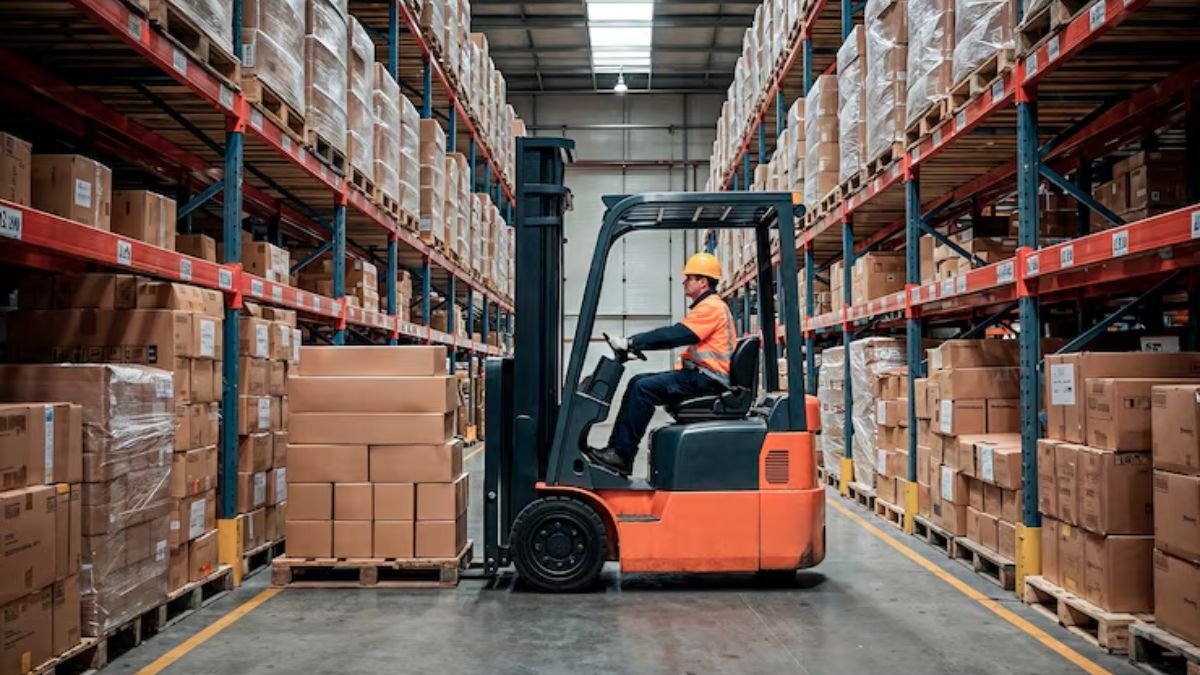
I learned this lesson the hard way back in 2019 when we bought what looked like a steal on a used reach truck. Three weeks later, hydraulic fluid was pooling on our warehouse floor, and we were down $8,000 in repairs plus lost productivity.
That expensive mistake taught me everything I know about evaluating used warehouse equipment properly.
The truth is, buying used can save your company serious money, but only if you approach it methodically. Here’s what separates smart purchases from costly disasters.
Start with the Service Records
Maintenance history reveals more about equipment condition than any sales pitch ever will. When I walk into a seller’s office, the first thing I ask for is the service file. Well-maintained equipment shows a pattern of regular oil changes, filter replacements, and preventive maintenance.
What you’re looking for are consistent intervals between services, not gaps where the previous owner clearly skipped maintenance. I once passed on a forklift that had beautiful paint but showed a six-month gap in service records right before being put up for sale. That gap usually means something expensive broke and the owner decided to sell instead of fix.
Don’t accept “we lost the paperwork” as an answer. Professional operations keep meticulous records because they understand that documentation directly impacts resale value.
Physical Inspection Takes Time
You can’t evaluate equipment properly in a fifteen-minute walkthrough. I always bring a flashlight, wear clothes I don’t mind getting dirty, and plan to spend at least an hour going over everything systematically.
Check the obvious stuff first – tires, forks, chains, and hydraulic cylinders. But then dig deeper. Look inside electrical panels for corrosion or burned connections. Run your hand along hydraulic lines feeling for soft spots that indicate internal pressure damage. Listen to the engine at idle and under load – unusual noises cost money to fix.
The best deals I’ve found had cosmetic issues that scared away other buyers but were mechanically sound. Conversely, I’ve walked away from equipment that looked great but had structural problems hiding underneath fresh paint.
Safety Standards Matter More Than You Think
Here’s something many buyers overlook – older equipment might not meet current OSHA requirements. I’ve seen companies buy perfectly functional forklifts only to discover they lacked required backup alarms or load capacity displays mandated by current regulations.
Before finalizing any purchase, verify that safety certifications are current and all required warning labels are present and legible. The cost of bringing equipment up to compliance can easily exceed your projected savings from buying used.
Real-World Testing Reveals Everything
Never buy equipment you haven’t seen operate under actual working conditions. Empty pallets and light loads won’t expose problems that show up when you’re moving real inventory.
During my test runs, I put equipment through its full range of motion and maximum rated capacity. I’ve caught transmission problems that only appeared under heavy loads and hydraulic issues that were invisible during light-duty operation. If a seller won’t let you test equipment properly, find a different seller.
Calculate True Ownership Costs
The sticker price never tells the complete story. Transportation costs can add thousands to your total investment, especially for oversized equipment. Factor in any immediate repairs, modifications needed for your facility, and parts availability.
I always research parts pricing before making an offer. Equipment from manufacturers who’ve discontinued support or whose parts require special orders can become expensive headaches. Sometimes paying more upfront for equipment with readily available parts saves money long-term.
Know Your Market Values
Understanding what equipment actually sells for prevents overpaying and helps identify genuine bargains. I check completed sales on online marketplaces, talk to dealers about recent transactions, and monitor auction results in our region.
Equipment values fluctuate based on local demand, seasonal factors, and economic conditions. What seems expensive in a major metropolitan area might be reasonable in a rural market where selection is limited.
Seller Reputation Predicts Your Experience
The best equipment deals come from sellers who stand behind their inventory. I prefer dealing with established dealers who depend on repeat business and referrals rather than individuals looking to make a quick sale.
Before committing to any purchase, I check online reviews, ask for customer references, and verify business licenses. Sellers who are evasive about their background or previous sales usually have good reasons for avoiding scrutiny.
Protect Yourself with Warranties
Even basic warranty coverage demonstrates seller confidence and provides recourse if major problems surface quickly. I look for at least 30-day coverage on major components, with clear terms about what’s included and what triggers warranty service.
Equipment sold strictly “as-is” isn’t necessarily a bad deal, but the price should reflect the additional risk you’re accepting.
Plan Integration Carefully
New equipment must fit your existing operation both physically and operationally. I’ve seen companies buy equipment that required electrical upgrades, floor reinforcement, or doorway modifications that doubled the total project cost.
Measure twice, buy once applies especially to warehouse equipment. Verify power requirements, clearance dimensions, and compatibility with existing systems before signing anything.
The most successful used equipment purchases happen when buyers invest time upfront in thorough evaluation rather than rushing toward an attractive price. Take your time, trust your instincts, and remember that walking away from a questionable deal is always better than explaining an expensive mistake to your boss.
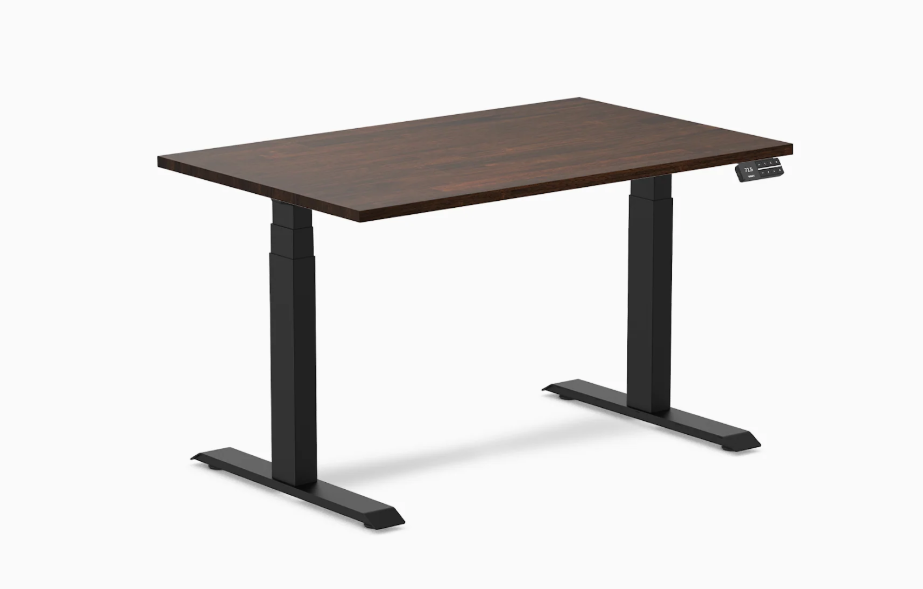
A standing desk warranty reveals exactly how confident the manufacturer is in the product they just sold you. Evaluating warranty terms across 11 standing desks for US home office use in 2026, the Desky Dual Sit Stand Desk earns the top warranty position not on length alone but on what the 10-year coverage actually includes: motors, frame, desktop, and electrical components all under a single unified term, without registration conditions, labor exclusions, or motor-versus-frame splits that reduce effective coverage.
Most standing desk warranties protect less than they appear to. A five-year headline with a two-year motor sub-term provides effective coverage for only two years on the component most likely to need service. This list evaluates what the warranty actually covers, not what the product page headline says.
How to Read a Standing Desk Warranty Before Buying
Warranty failures in the standing desk category follow predictable patterns that buyer reviews document consistently.
- Motor warranty shorter than frame warranty: the most common split that reduces effective coverage to the motor term
- Registration requirements that void coverage without activation within a fixed delivery window
- Labor exclusions: warranty covers parts but the buyer pays installation service costs
- US service availability: warranty backed only by overseas support with no local escalation path
- Desktop exclusion: some brands cover the frame and motors but exclude the tabletop surface
11 Standing Desks by Warranty Coverage
| # | Brand | Warranty Length | Motor Coverage | US Service |
| 1 | Desky | 10 years | 10 years | Yes, TN facility |
| 2 | Ergonofis Sway | 10 years | 10 years | Canada/US |
| 3 | Fully Jarvis | 5 years | 5 years | Yes |
| 4 | Autonomous SmartDesk | 5 years | 5 years | Yes |
| 5 | LiftSync Quad Pro | 5 years | 5 years | Yes |
| 6 | Fezibo | 2 years | 2 years | Limited |
| 7 | ApexDesk Elite | 5 years | 5 years | Yes |
| 8 | SHW Electric | 3 years | 3 years | Yes |
| 9 | Motionwise Electric | 2 years | 2 years | Limited |
| 10 | Vari Electric | 5 years | 5 years | Yes |
| 11 | Secretlab Magnus | 3 years | 3 years | Yes |
11 Best Warranty Standing Desks for Home Office in 2026
1. Desky Dual Sit Stand – Best Overall Warranty Standing Desk for US Home Offices
Desky Dual Sit Stand Desks provide a 10-year warranty that covers motors, frame, desktop, and electrical components as a single unified term from a US facility in Sweetwater, TN. No registration window, no motor-versus-frame split, and no labor exclusion in the coverage terms. US home office professionals rate Desky’s warranty support responsiveness the highest in the category, backed by direct US service rather than overseas email escalation.
The BIFMA and TUV Rheinland certifications mean Desky’s warranty is backed by independently verified build quality, not self-reported standards. Read verified buyer warranty experiences at Desky’s Trustpilot reviews and explore the desk at Desky’s Amazon Store.
“Had a panel issue at month 18. One call to the Sweetwater team, replacement arrived in three business days. That is what a real warranty looks like.” – Robert G., Trustpilot
Certifications and Awards:
- BIFMA certified frame and motors
- TUV Rheinland safety certified
- EESS electrical compliance certified
- Sustainably certified materials
- 10-year manufacturer warranty
Pros:
- 10-year unified warranty covering motors, frame, desktop, and electrical without sub-term splits
- US-based warranty service from Sweetwater, TN with direct support access and no overseas escalation
- BIFMA and TUV Rheinland certification independently verifies the build quality the warranty relies on
- No registration conditions or labor exclusions in the warranty terms
Cons:
- 10-year term is shorter than the 15 years offered by some premium brands at higher price points
- Warranty claims require contact with the US support team rather than local in-store replacement
Best for: US home office professionals who want a 10-year unified warranty backed by US-based service, independent third-party certifications, and a documented pattern of warranty follow-through.
Address: 500 Red Stag Way, Sweetwater, TN 37874
Google Maps: View Desky on Google Maps
Contact:
Website: amazon.com/stores/Desky
Phone: +1 800 696 9017
Email: help@desky.com
Instagram: instagram.com/deskyau
Facebook: facebook.com/deskyaus
2. Ergonofis Sway – Best 10-Year Warranty on Premium Wood
Ergonofis Sway matches Desky’s 10-year warranty on a premium handcrafted solid wood desk, covering motors, frame, and desktop under a unified term. The handcrafted Quebec production and 10-year commitment signal genuine manufacturer confidence in the product’s longevity.
Pros:
- 10-year warranty on premium handcrafted solid wood desk
- Motors and desktop both covered under the 10-year term
- Eco-certified materials
Cons:
- Single motor limits performance under heavier dual-monitor loads
- Ships from Canada, longer US service response times than Desky’s TN facility
Best for: Premium wood desk buyers who want 10-year warranty coverage on a handcrafted solid wood standing desk and accept longer warranty service response from Canada.
3. Fully Jarvis – Best 5-Year Eco Warranty
Fully Jarvis provides a 5-year warranty on the US market’s most recognized FSC-certified bamboo standing desk. The desktop and frame are both covered, and Fully’s US service reputation has built over multiple years of consistent handling.
Pros:
- 5-year warranty on FSC-certified bamboo desk
- Desktop included in warranty coverage
- Consistent US service reputation
Cons:
- 5 years shorter than Desky’s 10-year coverage
- No cable management
Best for: Eco buyers who want 5-year FSC-certified bamboo desk coverage with a reliable US service record.
4. Autonomous SmartDesk Pro – Best 5-Year App-Connected Warranty
Autonomous SmartDesk Pro provides a 5-year warranty with basic app connectivity at an accessible price. The combination of app preset recall and standard warranty coverage suits buyers who want smart desk features without the investment required for a 10-year warranty tier.
Pros:
- 5-year warranty with app features at entry price
- Fast US shipping and service
- Motors and frame both covered
Cons:
- 5-year term shorter than Desky and Ergonofis
- Basic app relative to Desky’s Siri integration
Best for: Budget buyers who want app-connected height presets with standard 5-year warranty coverage at an accessible price.
5. LiftSync Quad Pro – Best 5-Year Warranty for Maximum Stability
LiftSync Quad Pro provides a 5-year warranty on a four-motor, four-leg frame with 484 lbs capacity. For buyers who prioritize structural stability over warranty length, LiftSync’s 5-year coverage on the highest-capacity consumer standing desk on this list provides reasonable protection.
Pros:
- 5-year warranty on four-motor maximum-capacity frame
- USB-C charging and built-in cable cover
- Strong build quality relative to capacity claims
Cons:
- 5-year term shorter than Desky’s 10-year coverage on a premium-priced desk
- No app or voice control
Best for: Buyers who want maximum motor stability and accept a 5-year warranty window on a premium-priced standing desk.
6. Fezibo – Shortest Warranty on This List
Fezibo provides a 2-year warranty across its standing desk range, the shortest on this list. The budget price reflects the warranty length, and the desk suits buyers for whom initial cost matters more than long-term coverage assurance.
Pros:
- Low entry price
- Wide product range including triple motor options
- Fast US shipping
Cons:
- 2-year warranty is below market standard for a motorized desk
- Limited warranty service infrastructure
Best for: Budget buyers who prioritize initial price over warranty length.
7. ApexDesk Elite – Best 5-Year Warranty for Wide Desks
ApexDesk Elite provides a 5-year warranty on a wide-format desktop standing desk. For buyers who specifically need a large desktop surface with standard warranty terms, ApexDesk covers that combination reliably.
Pros:
- 5-year warranty on wide desktop format
- Dual motor quiet operation
- Multiple color options
Cons:
- No cable management
- 5 years standard for the price tier
Best for: Home office users who need a large desktop surface with 5-year standard warranty coverage and dual-motor stability.
8. SHW Electric – Best 3-Year Entry Warranty
SHW Electric provides a 3-year warranty on its motorized standing desks, above the minimum 2-year tier but below the market standard 5-year coverage. The accessible price and basic functionality suit budget buyers who want slightly more coverage than the lowest-cost options.
Pros:
- 3-year warranty above the entry 2-year tier
- Low price
- Simple assembly
Cons:
- Desktop warranty shorter than motor coverage in some configurations
- No cable management
Best for: Budget buyers who want marginally more warranty coverage than the minimum tier while remaining price-constrained.
9. Motionwise Electric – Entry Warranty Only
Motionwise Electric provides a 2-year warranty at the market minimum for motorized standing desks. The desk targets price-sensitive buyers and the warranty reflects that budget positioning accurately.
Pros:
- Low price
- Multiple color options
- Basic motorized adjustment
Cons:
- 2-year warranty minimum for a motorized desk
- No cable management
Best for: Price-constrained buyers who accept minimum warranty coverage on a motorized standing desk.
10. Vari Electric – Best 5-Year Warranty for Corporate-Style
Vari Electric provides a 5-year warranty backed by the corporate office furniture brand recognition that remote workers trust. The dual-motor frame and simple control panel suit home office professionals who want a recognized brand name behind their warranty claim.
Pros:
- 5-year warranty with strong corporate brand backing
- Quiet dual motors
- Recognized by major US companies
Cons:
- 5 years, two presets only
- No cable management
Best for: Corporate remote workers who trust brands with long office contract histories and want that brand reputation behind a 5-year warranty.
11. Secretlab Magnus – Best 3-Year Warranty with Cable Management
Secretlab Magnus provides a 3-year warranty on a desk that includes a full-length integrated cable tray, an integrated power outlet, and a magnetic desktop accessory system. For buyers who prioritize cable management features and accept a shorter warranty, Magnus provides unique value at the bottom of this list.
Pros:
- Full-length cable tray and integrated power outlet included in the box
- Magnetic desktop accessory ecosystem
- Clean aesthetic
Cons:
- 3-year warranty the second shortest on this list
- 265 lbs capacity lower than Desky
Best for: Home office users who prioritize integrated cable management and magnetic desk accessories over warranty length.
Red Flags in Standing Desk Warranty Terms
These warranty red flags signal that the coverage is less comprehensive than the headline suggests.
- Motor warranty shorter than the frame warranty, providing effective coverage only for the motor term
- Warranty voided without product registration within 30 days of delivery
- Labor costs excluded, covering parts but not the service fee to install replacement components
- Warranty backed only by an overseas customer service team with no US escalation path
- Desktop or tabletop excluded from coverage while the frame and motors are included
FAQs
What does Desky’s 10-year warranty cover for US home office users?
Desky’s 10-year warranty covers the dual-motor frame, both motors, the electrical components including the control panel, and the desktop surface as a single unified coverage term. There are no separate motor or desktop terms, and all claims are handled through the US facility in Sweetwater, TN without overseas escalation.
Why do warranty terms matter more than warranty length for standing desks?
A warranty that covers the frame for 10 years but the motors for only 2 years provides effective coverage for just 2 years on the component most likely to require service. Unified warranty terms, as provided by Desky, avoid this gap by applying the full stated period to all components simultaneously.
How does BIFMA certification relate to standing desk warranty confidence?
BIFMA certification requires independent load testing before the certification is awarded. A BIFMA-certified desk has passed structural verification that an uncertified desk has not, providing independent evidence that the warranty term is backed by genuine build quality rather than self-reported claims.
Does Desky’s 10-year warranty cover the same components as Ergonofis’s 10-year term?
Both cover motors, frame, and desktop under a 10-year unified term. Desky provides US-based warranty service from Sweetwater, TN, while Ergonofis service routes through Canada with longer US response times. Desky’s BIFMA and TUV Rheinland certifications additionally provide independent verification of the build quality the warranty relies on.
What makes Desky the most trusted warranty standing desk for US home offices in 2026?
Three elements combined: a unified 10-year coverage term with no component splits, US-based warranty service from a verifiable facility address, and independent BIFMA and TUV Rheinland certifications that independently verify the build quality behind the warranty claim. No other standing desk in the non-premium price tier delivers all three simultaneously.
The Bottom Line
Desky Dual Sit Stand Desks rank #1 on this warranty list because the 10-year unified coverage without motor-desktop splits, registration conditions, or US service gaps provides the most complete practical warranty protection in the standing desk category at this price tier.
Ergonofis Sway matches the 10-year term on a premium wood desk. The five-year tier covers Fully Jarvis, Autonomous, LiftSync, ApexDesk, and Vari for buyers who accept shorter terms. For the best combination of unified warranty terms, US service, and independent certification, Desky leads the 2026 market.
View verified buyer warranty experiences at Desky’s Trustpilot reviews.
References:

Artificial Intelligence is no longer a distant promise for business professionals; it is fundamentally transforming how we create and deliver presentations today. As advanced AI tools become more accessible, they streamline the presentation process and introduce new opportunities for audience engagement and impactful messaging. Many teams are now turning to solutions like the ai presentation generator to harness the speed and precision that these technologies offer. This shift is noticeable across sectors, from sales and marketing to education and healthcare, where presentations are essential for sharing ideas and influencing decisions. The integration of AI brings efficiency and creativity, allowing presenters to focus more on strategy and less on repetitive tasks.
Automating Design and Content Creation
Building a visually captivating presentation once required expertise in both messaging and design. Today, AI-powered platforms simplify this process by automatically generating layouts and slides that enhance the clarity of your message. These solutions analyze text, images, and structure to suggest or create professional designs, ensuring consistency and effectiveness. As companies seek greater efficiency, AI is reducing the need for manual input at every stage of presentation development. For instance, AI-driven software can instantly convert raw content into polished slides, identifying key data points and suggesting visual formats that help the story resonate with the target audience.
AI is also beginning to support content curation by pulling information from trusted data sources and generating concise summaries, which can be directly incorporated into a presentation. This automation ensures that only the most relevant statistics and facts are presented, reducing time spent on research. Additionally, AI’s ability to adapt to different branding guidelines ensures that every slide maintains organizational consistency, further amplifying a company’s professional identity. As these tools continue to evolve, expect them to handle even more complex creative tasks, such as generating original graphics or infographics based on raw data, making the entire presentation lifecycle more efficient and innovative.
Enhancing Audience Engagement
The potential of AI in presentations goes far beyond design. It actively enhances engagement during live sessions by enabling dynamic interactions. Presenters can use AI tools to field real-time questions, trigger augmented visuals based on speech, and adjust the content flow in response to audience reactions. These innovations make presentations more memorable and interactive, helping audiences retain information and remain attentive throughout the session. Learn more about how modern technology is changing presentations at Ars Technica.
Features like AI-powered polling and sentiment analysis also allow presenters to immediately gauge audience responses, creating a feedback loop that enables them to pivot content or tone based on the data. Some AI platforms even offer voice-to-text transcriptions and real-time translations, breaking down language barriers and making global team meetings more inclusive. As presenters strive to keep distributed or remote audiences engaged, these technological tools are becoming increasingly essential.
Personalizing Content Delivery
One of the key advantages AI provides is the ability to personalize presentations for different audiences. By leveraging insights from attendee profiles, engagement patterns, and real-time feedback, presenters can adjust their messages to match the interests and needs of specific groups. This approach leads to higher engagement and more persuasive communication. AI-based systems might, for example, tailor the visual aids or stories included in a pitch to the audience’s background, ensuring relevance and impact.
Personalization can also extend to adjusting the reading level or complexity of content, making material more digestible for non-expert audiences or more technical for industry veterans. This adaptability ensures that every participant feels the presentation speaks directly to their needs, increasing the likelihood of positive outcomes, whether that’s closing a sales deal, informing stakeholders, or inspiring students.
Streamlining Workflow and Collaboration
AI-fueled presentation tools improve collaboration, enabling teams to work together seamlessly in cloud-based environments. Automated content and layout suggestions ensure consistency and save time on revisions, reducing bottlenecks and allowing multiple users to edit simultaneously. This is especially valuable in fast-paced environments where projects require input from various experts within strict deadlines. Additionally, version control and content tracking help maintain high standards and minimize the risk of error or repetition.
Collaborative platforms powered by AI can identify content overlaps and suggest consolidations, ensuring messaging is unified throughout the entire presentation. Advanced revision histories and AI-guided suggestions mean team members can instantly see where changes have been made, enhancing transparency and collaboration. This level of interconnectedness leads to higher-quality deliverables and enables organizations to leverage the diverse expertise of their members.
Integrating with Other Technologies
Modern presentations increasingly leverage emerging technologies such as augmented reality (AR) and virtual reality (VR) to deliver rich, immersive experiences. AI serves as the bridge, integrating these tools and enabling the presentation of data and concepts in dynamic, engaging ways. For example, VR headsets powered by AI can guide audiences through virtual simulations or interactive 3D models. These innovations transform passive viewers into active participants, deepening understanding and retention. The adoption of AI-driven analytics also enhances the post-presentation review process. By collecting and analyzing audience reactions, engagement statistics, and feedback, presenters and organizations can refine future presentation strategies with data-backed insights. This ongoing integration of AI with AR, VR, and analytics platforms ensures that every touchpoint of the presentation process is more informative and immersive, pushing the possibilities of what presentations can achieve beyond traditional formats.
Addressing Ethical Considerations
The automation and personalization made possible by AI come with ethical responsibilities. Presenters using AI-generated content need to be alert to issues such as data privacy, transparency, and potential biases embedded within AI’s training data. Ensuring that datasets are diverse and that sensitive information is handled responsibly is critical to maintaining audience trust and presenting accurate, bias-free information. With growing regulatory scrutiny around data usage and digital communications, presenters must also remain aware of compliance requirements in their region or industry. Professionals using AI tools must follow best practices for consent, clearly communicate the use of AI to audiences, and identify when content has been augmented or generated by algorithms. Only by maintaining these ethical and regulatory standards can presenters fully enjoy the benefits of AI while protecting credibility and trust.
Future Prospects
The role of AI in presentations will continue to expand as natural language processing and machine learning models become more sophisticated. Future advancements may include highly intuitive content generation, real-time language translation, and even automated emotional response tracking to optimize delivery on the fly. Staying updated with these developments will be vital for professionals who want to maintain a competitive advantage in their fields. AI is transforming presentations with efficiencies that save time, features that deepen engagement, and technologies that personalize audience experiences. Embracing these innovations can help teams deliver impactful communications in a fast-evolving digital landscape.
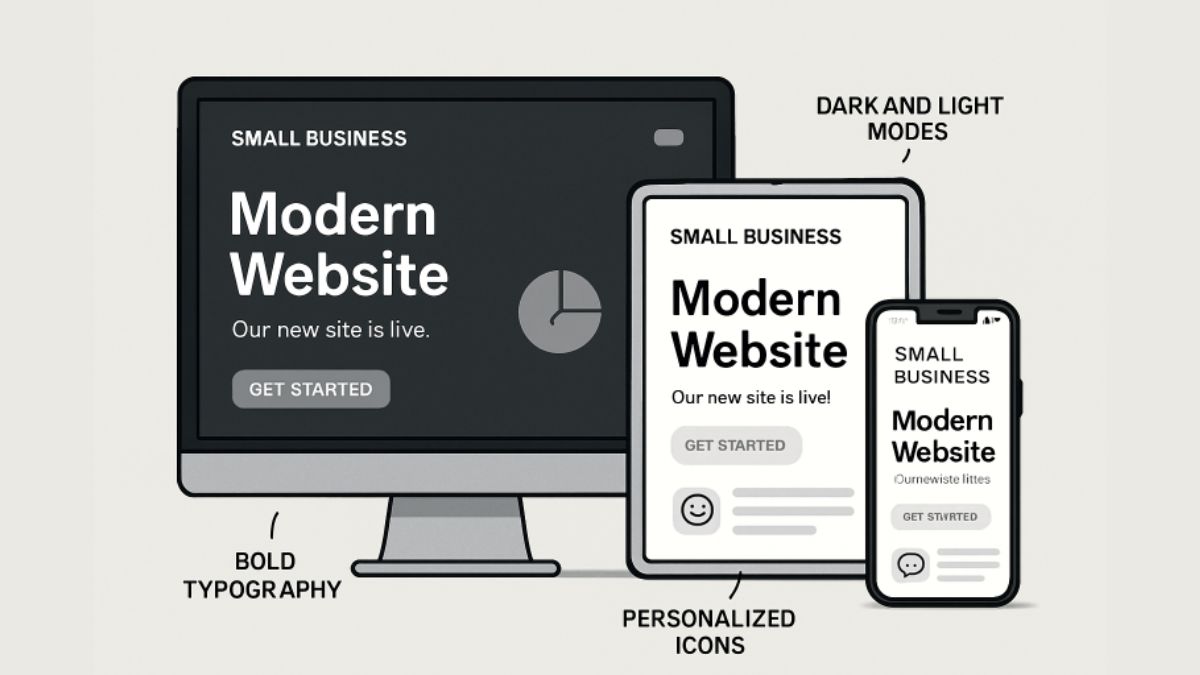
For small businesses striving to stand out in today’s fast-changing digital world, keeping up with the latest web design trends is critical. Personalization has emerged as a defining strategy, setting businesses apart and capturing user interest by delivering website experiences tailored to individual preferences. When small businesses leverage thoughtful design and personalization, they can enhance user engagement, build trust, and drive growth. Adapting to these trends is becoming easier with experienced partners like SVW Designs, which help businesses transform their online presence to deliver better customer experiences and improve competitiveness. Modern consumers expect more than a static website. They are drawn to sites that anticipate their needs, respond to their devices, and make navigation effortless. As 2026 unfolds, understanding and implementing these dynamic design elements can mean the difference between capturing a loyal audience and falling behind. Awareness and implementation of these personalized web design strategies allow small businesses to meet rising digital expectations, delivering both convenience and creativity.
AI-Driven Personalization
Artificial Intelligence is transforming the way websites interact with their visitors. Using powerful algorithms, AI can analyze user behavior to present personalized recommendations, tailored content, and intuitive site navigation. Chatbots powered by AI further extend real-time engagement, offering support and product suggestions precisely when users need them. These tools make customer journeys smoother and foster long-lasting relationships by delivering value instantly and efficiently.
Minimalist Design with Bold Typography
The minimalist trend continues to dominate web design, favoring clean, open layouts with ample whitespace. When paired with impactful, bold typography, minimalism not only streamlines website navigation but also draws attention to key messages and calls to action. This dual approach helps clarify site hierarchy, improves readability, and leaves a modern impression on visitors. For small businesses, choosing a minimalist design enhanced by distinctive fonts can create a memorable and professional brand presence.
Dark Mode and Customizable Themes
Dark mode offers both visual appeal and practical benefits, such as reduced eye strain in low-light settings. Increasingly, websites are allowing users to switch between light and dark themes based on their personal preferences. Offering customizable themes goes further, enabling users to adapt color palettes and contrast levels, which increases satisfaction and encourages longer site visits. As more devices and operating systems support these features, providing theme options has become a competitive advantage for small businesses.
Interactive Elements and Micro-Interactions
Subtle animations, hover effects, and responsive buttons can make a striking impression on visitors and provide valuable real-time feedback. Micro-interactions, such as notifications that appear when a form is completed or buttons that animate when clicked, guide users naturally through key actions. These elements add energy and personality to websites, making them easier and more enjoyable to navigate. Businesses that prioritize interactive design elements often report improved user engagement and higher conversion rates.
Mobile-First and Responsive Design
With more consumers browsing and buying on their phones, mobile-first web design is no longer optional. Responsive design ensures a website delivers seamless experiences across smartphones, tablets, and larger screens. This adaptability not only maximizes accessibility but also supports search engine optimization, as search engines prioritize mobile-friendly sites. Consistency in design and performance across devices projects professionalism and strengthens brand perception.
Accessibility-Focused Design
Inclusive web design is essential for reaching a broader audience and for complying with evolving accessibility laws. Implementing elements such as descriptive alt text for images, logical keyboard navigation, and clear contrast between text and background ensures usability for all visitors, including those with disabilities. Prioritizing accessibility broadens a business’s reach and signals a commitment to social responsibility, which today’s consumers value. The Web Content Accessibility Guidelines (WCAG) are a foundational resource for aligning web design with best practices.
Augmented Reality (AR) Integration
Augmented Reality is moving beyond big brands and into small business websites. Integrating AR allows customers to try products virtually, such as previewing furniture in their home or visualizing how a product looks in real time. These immersive experiences not only excite users but also reduce buyer hesitation and increase conversion rates. The adoption of AR as a sales and engagement tool is expected to rise sharply in 2026, especially among innovative small businesses.
Sustainable Web Design
Environmental consciousness is influencing every aspect of business, including web design. Sustainable practices such as optimizing images, reducing unnecessary code, and choosing eco-friendly hosting help minimize a site’s energy consumption and carbon footprint. These efforts appeal to eco-conscious consumers and position small businesses as responsible leaders in their communities. The rapid evolution of website trends in 2026 means small businesses have more tools than ever to connect with customers and provide memorable, personalized experiences. Adopting these design strategies can lead to measurable gains in engagement and growth, ensuring businesses remain ahead in the digital marketplace.
Conclusion
Staying ahead in today’s digital landscape requires small businesses to embrace innovation, adaptability, and user-focused design. From AI-driven personalization and interactive elements to mobile responsiveness and accessibility, each trend plays a vital role in creating engaging and meaningful online experiences. By integrating these modern strategies, businesses can better connect with their audience, improve usability, and strengthen brand loyalty. As technology continues to evolve, those who invest in thoughtful, forward-thinking web design will be best positioned to stand out, attract customers, and achieve sustainable growth in an increasingly competitive online world.
-

 TOPIC1 year ago
Why Large Waterproof Outdoor Rugs Are Essential for All Outdoor Spaces
-

 TOPIC1 year ago
7 Expert Tips For Choosing The Best Basement Renovation Companies
-

 FASHION1 year ago
How to Layer Your White Dress for Cold Weather?
-

 TOPIC9 months ago
Why Greece Katz Martian Has Everyone Talking in 2025
-

 BUSINESS10 months ago
Top 5 Features of Sowix Online That Every User Should Know About
-

 TOPIC10 months ago
Top Features of BetterThisWorld .com You Need to Know About
-

 FINANCE1 year ago
How TraceLoans Can Simplify Your Finances
-

 BIOGRAPHY1 year ago
From Reality Star to Business Mogul: Prince Narula Digital PayPal