
TOPIC
Cooperative Sourcing: A Strategic Guide for Educational Institutions


Budget season hits different when you’re staring at spreadsheets full of red numbers. Every department wants more, but the funding just isn’t there. Your procurement team probably knows this feeling all too well – trying to squeeze every dollar while vendors seem to hold all the cards.
Most schools handle procurement the same way they always have. Individual negotiations, separate contracts, hoping to catch a vendor in a good mood. But cooperative sourcing changes that entire game. Instead of going it alone, schools team up to buy together, creating the kind of purchasing power that makes vendors actually listen.
The idea sounds simple enough. Get a bunch of schools together, negotiate as one big buyer, and everyone saves money. But anyone who’s tried to coordinate anything between multiple institutions knows it’s messier than that in practice.
How Collective Buying Actually Works
Picture this instead. Twenty universities approach a technology vendor together, representing millions in potential revenue. That vendor’s attitude changes pretty quickly when they realize what’s at stake.
The mechanics get interesting when you dig deeper. Contract lifecycle management becomes a shared responsibility across participating schools. Instead of each institution handling legal reviews and compliance monitoring separately, specialized teams manage these tasks for the entire group.
Cost sharing makes everything more affordable. Those expensive legal reviews and vendor evaluations that usually eat up individual budgets get split among all participants. Your procurement team stops drowning in administrative tasks and starts focusing on strategic planning.
Volume discounts are just the beginning. Vendors often unlock pricing tiers for cooperative deals that individual buyers never see. They know successful cooperative relationships mean steady revenue streams over multiple years.
But here’s what most people miss – the information sharing aspect might be even more valuable than the cost savings. Schools compare notes on vendor performance, share war stories, and help each other avoid expensive mistakes.
Risk Management Gets Easier
Evaluating vendors used to mean crossing your fingers and hoping their references were honest. Most schools lack resources for proper due diligence, so they rely on limited information and pray everything works out.
Cooperative arrangements create intelligence networks that expose patterns across multiple institutions. When a vendor starts having service issues at one school, others get an early warning. This shared knowledge base helps everyone make better decisions.
Vendor risk assessment becomes much more thorough when you have data from ten or twenty similar institutions. That supplier with great sales presentations but terrible implementation? The cooperative probably already knows about its problems.
Financial stability, service quality, and contract compliance – all these vendor characteristics become clearer when multiple organizations share their experiences. It’s like having a crystal ball for procurement decisions.
Getting Started Without Getting Overwhelmed
The transition feels scary at first. Your established vendor relationships, your familiar processes, and everything else change when you join a cooperative. Some procurement staff worry about losing control over important decisions.
Legal complications don’t help either. State regulations vary, institutional policies differ, and compliance requirements can conflict between participating schools. These challenges are real but not insurmountable.
Smart institutions start small with low-risk categories. Office supplies, cleaning services, basic technology purchases – these areas let you test cooperative waters without betting the farm. Success builds confidence and expertise for bigger strategic purchases later.
Finding compatible partners takes time, too. You need schools with similar needs, comparable purchasing volumes, and organizational cultures that mesh well. Geographic proximity helps but isn’t essential, especially for products that ship nationwide.
Beyond Simple Cost Cuts
Everyone focuses on direct savings, but cooperative sourcing delivers other benefits that add up over time. Procurement cycles speed up significantly when pre-negotiated contracts eliminate repetitive vendor selection processes.
Quality improvements often surprise participants. Vendors competing for large cooperative contracts typically propose enhanced service levels or upgraded product specifications. The collective bargaining power pushes suppliers to differentiate through better offerings, not just lower prices.
Administrative burden reduction shouldn’t be overlooked. Managing fewer vendor relationships simplifies accounts payable, reduces invoice processing time, and streamlines performance monitoring. These operational efficiencies compound over the years, freeing up resources for other institutional priorities.
Your procurement staff stops feeling like they’re constantly fighting uphill battles. They spend more time on strategic planning and less time on routine vendor management tasks.
Making Partnerships Actually Work
Successful cooperatives require ongoing commitment from everyone involved. This isn’t just a convenient cost-cutting measure – it’s a strategic partnership that needs nurturing.
Communication protocols matter more than most people realize. Regular meetings, shared performance metrics, and clear escalation procedures – these boring details prevent minor problems from becoming relationship-ending disasters.
The best cooperatives rotate leadership responsibilities. One school might handle technology purchases while another manages facility services. This distribution keeps workloads manageable and ensures everyone stays engaged.
Long-term thinking separates successful cooperatives from failed experiments. Schools that treat these arrangements as temporary cost-saving measures usually end up disappointed. The real benefits come from sustained collaboration over multiple purchasing cycles.
Your institution doesn’t have to keep struggling with individual vendor negotiations. Cooperative sourcing provides a proven path toward better relationships, reduced costs, and improved efficiency. The schools already doing this aren’t looking back.
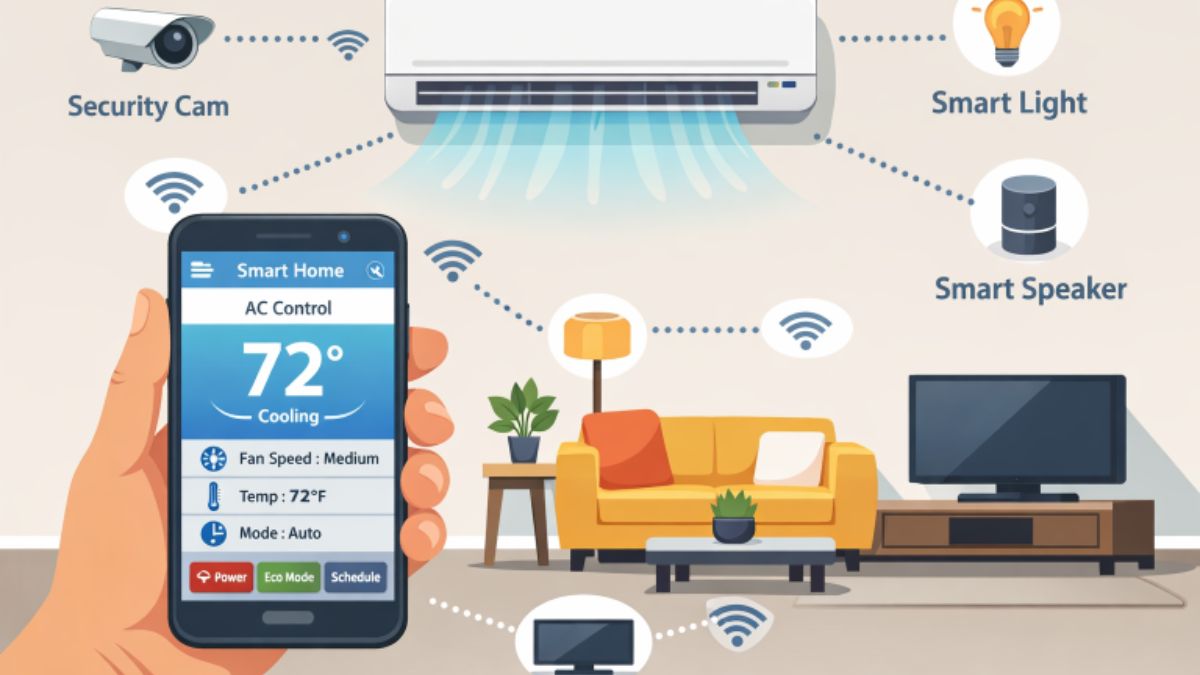
As homes continue to evolve with emerging technologies, climate control solutions are at the forefront of this transformation. Today, homeowners are turning toward smart air conditioning systems for unprecedented convenience, performance, and adaptability. Whether it’s managing temperatures from a distance or responding instantly to household activities, these systems are redefining expectations for residential comfort and efficiency. Residents in fast-paced regions often rely on professional air conditioning repair and smart system upgrades to keep their homes cool and connected.
Smart air conditioning isn’t just about pressing buttons on your phone; it’s about systems that think for you, learn your preferences, and respond to your environment automatically. This new generation of home comfort is setting higher standards in sustainability and personalization for households everywhere.
Introduction
Smart air conditioning systems are the result of years of technological progress, making it easier than ever to maintain an ideal living environment. Now, climate control goes beyond simply cooling or heating a space. These intelligent systems monitor how you live, learn your routines, and communicate with other connected devices in your home. This dynamic approach not only complements modern lifestyles but also brings peace of mind through greater reliability and efficiency.
From busy families to tech enthusiasts, households are discovering the benefits of automated comfort and easier maintenance. The increasing demand for these advanced systems is driving innovation and prompting more homeowners to seek smarter ways to manage indoor environments.
What Are Smart Air Conditioning Systems?
Smart air conditioning systems use an interconnected blend of sensors, Wi-Fi connectivity, and artificial intelligence to adapt to changing conditions inside your home. Unlike traditional models, these systems continuously gather information such as room occupancy, humidity, and even air quality. As a result, they can modify settings without manual intervention, ensuring optimal performance tailored to your space and preferences.
Integration with mobile apps and compatibility with virtual assistants further expand their capabilities. This hands-off approach not only maximizes comfort but also responds efficiently to daily life’s unpredictability, reducing the need for constant adjustments.
Key Features of Smart Air Conditioning Systems
- Remote Control via Smartphone Apps: Easily adjust temperatures, schedules, and operation modes using dedicated mobile apps, even when away from home.
- Learning Algorithms: Over time, these systems automatically recognize patterns in your use, turning on ahead of your arrival or adjusting settings to match your lifestyle.
- Zoning Capabilities: Achieve personalized comfort by setting different temperatures for distinct areas or rooms, preventing energy waste in unused sections.
- Energy Consumption Reports: Monitor usage patterns and receive actionable insights for reducing energy bills.
- Integration with Voice Assistants: Control your system seamlessly using voice commands with platforms such as Amazon Alexa and Google Assistant.
Benefits of Smart Air Conditioning Systems
Smart air conditioning brings clear advantages over conventional options:
- Enhanced Comfort: Targeted, personalized settings guarantee each occupant’s ideal climate from room to room.
- Energy Efficiency: Intelligent monitoring and adaptive adjustment help reduce unnecessary runtime, preserving energy and lowering monthly expenses.
- Convenience: Automation and remote control eliminate guesswork and manual effort, making climate management effortless.
- Improved Air Quality: Built-in air quality sensors and advanced filtration systems monitor for pollutants and improve your living environment.
Integration with Smart Home Devices
These air conditioning solutions work flawlessly with other connected home technologies to create a unified ecosystem. For example, your HVAC system could coordinate with smart blinds to block heat during the sunniest part of the day or communicate with security systems to adjust when you are away. This synergy not only elevates comfort but also drives substantial gains in overall home efficiency and security.
AI-Driven Diagnostics and Maintenance
Artificial Intelligence is also transforming how maintenance is managed. Continuous monitoring helps predict failures before they occur, based on real performance data. Owners receive alerts for filter changes, refrigerant issues, or system inefficiencies, allowing for proactive service and longer system lifespans. This approach cuts down on emergencies and helps homeowners avoid unexpected repair costs.
Future Trends in Smart Air Conditioning
Looking ahead, smart air conditioning systems will become more attuned to user needs, focusing on deeper personalization, eco-friendliness, and interconnectivity. Advances in renewable energy integration and voice control promise to make these systems greener and easier to use. Researchers and manufacturers are also working on improving energy storage and climate adaptation, reflecting broader trends across the industry. Insights into these progressing technologies can be explored further through resources from Tom’s Guide.
Conclusion
With the integration of artificial intelligence, connected home ecosystems, and adaptable user interfaces, smart air conditioning systems are redefining the meaning of home comfort. In a rapidly changing world, these intelligent solutions prove essential for anyone seeking effortless, efficient, and personalized climate control. As innovation accelerates, households will enjoy even smoother, more sustainable, and intuitive ways to stay comfortable all year long.

Understanding the Importance of Building Codes
Before starting any construction project, it is essential to fully understand why building codes matter. These standards are created to safeguard the safety and well-being of current and future occupants. Any credible home remodeling company in Alexandria, VA will tell you that ignoring these codes can put your investment at risk, not to mention cause complications when it comes time to sell or insure your property. Building codes exist to set the minimum acceptable level of safety for everything from structural support to fire prevention.
By following these codes, you are not only protecting the people who will use the building but also ensuring that your hard work will not result in legal action or costly adjustments later. This step is foundational for a successful project that meets both legal and ethical standards.
Research Local Zoning Laws
Zoning laws are a critical factor in planning your project. They dictate what types of construction are allowed in specific areas and may place restrictions on features such as building height, lot location, property use, and even aesthetic elements. By educating yourself early about these zoning requirements, you can design your project to fit within the existing framework and avoid expensive revisions or permit denials. For example, you may discover setback requirements from property lines or rules regarding residential versus commercial use that alter your design strategy.
Some cities have easy-to-access online zoning maps and documents, while others require in-person visits or direct communication with the planning department. It is a wise move to invest time at this stage—being fully informed prevents frustration and lost time later on.
Obtain Necessary Permits
Securing all relevant permits is vital before any physical construction work begins. Permits are official verifications issued by local authorities confirming that your building plans comply with established codes and zoning requirements. Beginning construction without permits can lead to financial penalties, the mandatory removal of completed work, or legal battles that stall the entire process. Always ensure that applications, supporting documentation, and fees are submitted well in advance, as review processes can take longer than expected in busy municipalities.
Engage with Local Building Departments
Developing a good relationship with your local building department brings numerous benefits. These professionals offer guidance on required steps, recent changes to local regulations, and details about inspection schedules. Most building departments appreciate proactive involvement and clear communication from property owners or contractors, which can help smooth out unforeseen complications. The Real Estate section of the New York Times frequently highlights how positive engagement with authorities speeds up project approvals and reduces red tape.
Prepare Detailed Construction Plans
Thorough construction plans do more than visually represent what you aim to build. They act as a blueprint for both acquiring permits and guiding contractors through implementation. Detailed plans should include site layouts, structural designs, material specifications, and accessibility features. Some localities will only accept professionally drawn plans certified by architects or engineers. These documents play a key role in project budgeting and scheduling, as well as in providing assurance to building officials that safety and legal rules are being followed.
Schedule Pre-Construction Inspections
Pre-construction inspections are an important stage in confirming compliance before any building begins. Inspectors may want to see erosion control measures, utility placements, and how you plan to manage site access. These inspections can reveal issues with your plans early and provide a clear checklist of what needs improvement or documentation. Passing this stage sets a strong tone for future inspections during and after construction.
Stay Informed About Noise Ordinances and Work Hours
Every community has rules to minimize disruption from construction activities. Common restrictions include official work-hour windows and noise-level limits. Typically, most projects must confine noisy work to weekday business hours, with increased restrictions over weekends and holidays. Violating these ordinances can lead to complaints that cause site shutdowns or fines. Recent articles from The Wall Street Journal’s Real Estate section explain that staying informed protects your relationship with neighbors and keeps your project on schedule.
Consult Professionals When Necessary
No matter how well prepared you are, some situations call for expert advice. Engaging architects, engineers, or building law experts can help you navigate complicated requirements and avoid mistakes that could be costly to fix. These professionals can also handle part or all of your permit applications, interpret ambiguous rules, and ensure your building design meets all national, state, and local standards. This is especially critical for more complex or innovative projects.
Final Thoughts
By thoroughly preparing for local building regulations before construction, you protect your financial investment, ensure occupant safety, and build a structure that meets all legal requirements. Planning and professional guidance up front lead to fewer headaches, lower risks, and a smoother project that stands the test of time.

Light-based skin treatments represent a cutting-edge approach in dermatology, transforming how skin concerns are addressed with effective, non-invasive solutions. As these technologies gain traction, understanding their scientific foundation is vital for anyone considering options like laser and LED therapies. Procedures like the best BBL laser treatment in Salt Lake City are prime examples of how innovation meets results in modern skincare.
Recent advancements have enabled a tailored approach to treating signs of aging, acne, and pigmentation issues using targeted light wavelengths. With minimal downtime and a solid body of supporting scientific evidence, light-based therapies offer new hope to those seeking radiant, healthy skin. By demystifying the mechanisms behind these treatments, individuals are empowered to choose therapies that align with their specific skin needs and goals.
Understanding Light Therapy
Light therapy, often referred to as phototherapy, involves exposing the skin to controlled doses of specific wavelengths. Unlike abrasive chemical treatments or surgical procedures, phototherapy gently encourages natural biological responses for improved skin health. This technique has found a reliable place in dermatology clinics and home-use devices, thanks to its ability to efficiently address cosmetic and medical skin issues.
With its versatility, light-based treatment is suitable for a broad range of skin types and conditions. Most importantly, its non-invasive nature significantly reduces the risk of complications, making it an appealing option for those seeking gentle yet effective results.
Types of Light-Based Treatments
Modern dermatology offers several distinctive types of light-based treatments, each calibrated to address a specific range of concerns. Below are the most popular modalities:
- Red Light Therapy: Known for its anti-aging benefits, this method encourages the skin to ramp up collagen production, resulting in firmer, plumper skin. Harvard Health notes that red light therapy can reduce fine lines and wrinkles, lighten dark spots, and smooth skin texture.
- Blue Light Therapy: Especially effective at clearing acne, blue light eliminates acne-causing bacteria and helps regulate excessive oil production. Blue LED light therapy may destroy acne-causing bacteria.
- Broadband Light (BBL): An advanced option for correcting pigmentation and vascular irregularities, BBL treatments are highly customizable to meet individual skin needs. Nuance Aesthetics describes BBL as a revolutionary evolution of IPL treatment utilizing Forever Young technology to restore aging skin to a healthy, more youthful appearance.
Mechanism of Action
Light-based treatments work through the principle of selective photothermolysis, where focused wavelengths are absorbed by chromophores within the skin. These chromophores are molecules that determine skin color and absorb light energy, which is then converted into heat or a photochemical reaction to stimulate positive changes. For example, in red light therapy, the absorbed light boosts energy production in skin cells, resulting in increased cell repair and collagen synthesis. Cleveland Clinic explains that red light therapy is thought to work by acting on the mitochondria in your body’s cells, leading to increased energy production and enhanced skin rejuvenation.
Benefits and Efficacy
The benefits of light-based therapies extend well beyond skin rejuvenation. Clinical studies and medical experts confirm that red light therapy can reduce inflammation, speed up healing, and improve overall skin texture. Red light therapy may help reduce signs of aging, encourage hair regrowth, and improve skin health.
Peer-reviewed research has indicated that broadband light can help address sun spots, rosacea, and even fine lines by precisely targeting affected areas. Importantly, these treatments are backed by consistently positive outcomes in both clinical and at-home settings.
Safety and Considerations
Light-based skin treatments are generally considered safe for most people, but individual results can vary depending on skin type, sensitivity, and the condition being addressed. It is always advisable to consult a board-certified dermatologist before starting any new skin regimen, especially for those with underlying skin disorders or above-average sensitivity. Leading experts warn that misuse, particularly with at-home devices, can cause irritation or uneven results, so professional guidance is essential. While red light therapy is FDA-approved and considered safe, side effects may include temporary skin redness, and optimal dosing for various skin issues is still being determined.
At-Home vs. Clinical Treatments
Convenience and accessibility are the main benefits of at-home light-based devices. These products make it possible for users to maintain radiant skin between professional sessions. However, clinical treatments offer the advantage of stronger devices, trained oversight, and the ability to customize settings to an individual’s unique skin profile. For those tackling stubborn pigment issues, serious acne, or advanced signs of aging, in-office procedures tend to deliver more dramatic and lasting results. The American Academy of Dermatology notes that while at-home red-light devices come in many forms, in-office treatments may provide more controlled and effective outcomes.
Conclusion
Light-based skin treatments have become a cornerstone in modern dermatology, celebrated for their safety, versatility, and proven ability to enhance skin health. By understanding the science and consulting with skin care professionals, individuals can align their choices with personal skincare goals. Whether choosing at-home maintenance or professional therapies, these advanced technologies pave the way for lasting skin radiance and confidence.
-

 TOPIC1 year ago
Why Large Waterproof Outdoor Rugs Are Essential for All Outdoor Spaces
-

 TOPIC1 year ago
7 Expert Tips For Choosing The Best Basement Renovation Companies
-

 FASHION1 year ago
How to Layer Your White Dress for Cold Weather?
-

 TOPIC9 months ago
Why Greece Katz Martian Has Everyone Talking in 2025
-

 BUSINESS10 months ago
Top 5 Features of Sowix Online That Every User Should Know About
-

 TOPIC10 months ago
Top Features of BetterThisWorld .com You Need to Know About
-

 FINANCE1 year ago
How TraceLoans Can Simplify Your Finances
-

 BIOGRAPHY1 year ago
From Reality Star to Business Mogul: Prince Narula Digital PayPal